Series Overview
This article series documents the design and implementation of a real-world Windows Server lab that combines system administration, monitoring, and security operations. The project reflects an environment already applied in a practical scenario and is designed to mirror enterprise infrastructure as closely as possible.
Parts
-
Part 1: Architecture & Network Design
-
Part 2: Active Directory, File Services & Administration Tasks
-
Part 3: Monitoring, Detection & Incident Analysis
-
Part 4 (optional): Lessons Learned & Real-World Value
Part 1: Architecture & Network Design
Introduction
In this first part of the series, we focus on the architectural decisions behind the lab environment and explain how proper network design and segmentation were implemented. The goal was not simply to build a functional lab, but to design an infrastructure that behaves like a real enterprise environment – supporting both daily system administration tasks and centralized monitoring.
Design Goals
Before deploying any virtual machines, the following design principles were defined:
-
Realistic enterprise-style architecture
-
Clear separation between management traffic and monitoring traffic
-
Centralized identity and access control
-
Visibility at both host and network level
-
Scalability for future expansion
These goals guided every architectural decision in the project.
Virtual Machine Overview
The lab consists of five core virtual machines:
1. Windows Server – Active Directory & RDS
This server acts as the backbone of the environment:
-
Domain Controller (Active Directory)
-
DNS Server
-
Remote Desktop Services (RDS) for administrative access
Centralizing authentication and DNS allows all other systems to behave as domain-managed assets, just like in a production environment.
2. Windows File Server
The File Server is domain-joined and responsible for:
-
Hosting shared folders
-
Enforcing NTFS and share-level permissions
-
Supporting file recovery scenarios via Shadow Copies
This server enables realistic permission management and troubleshooting use cases.
3. Windows Client
Although optional in some lab setups, a Windows client was intentionally included:
-
To simulate real user behavior
-
To generate authentication, file access, and policy-related events
-
To validate Group Policy and access control
This significantly improves the realism of monitoring and incident analysis.
4. Wazuh Manager + OpenSearch
This VM provides host-based monitoring and log aggregation:
-
Windows Event Log collection
-
File integrity monitoring
-
Security alerting and correlation
-
Centralized visibility into system activity
Wazuh acts as the primary platform for system-level monitoring.
5. Security Onion
Security Onion is deployed as a network monitoring sensor:
-
Passive traffic inspection
-
Network-based intrusion detection
-
Protocol analysis and session visibility
-
Detection of suspicious network behavior
It complements Wazuh by focusing on network activity rather than host events.
6. Ubuntu Server 24.04 – Router / DHCP / DNS
Ubuntu Router VM role:
-
Routing: Connects the different subnets (e.g., management, monitoring, lab network).
-
NAT: Allows the VMs to access the Internet through the host, if needed.
-
DHCP / DNS (optional): Can assign IPs to the lab VMs or provide DNS resolution.
-
Firewall / Security: Can filter traffic between subnets.
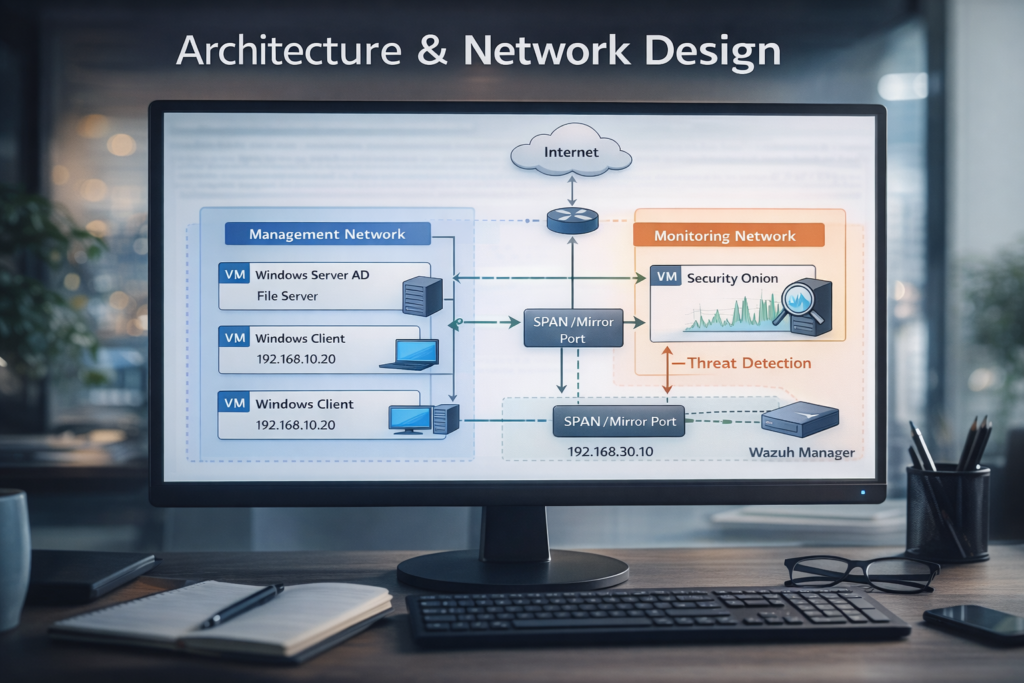
Network Segmentation Strategy
To reflect real enterprise environments, the lab uses logical network separation:
Management Network:
-
Used by all servers and clients
-
Handles authentication, file access, RDS, and normal operations
-
Represents the internal corporate network
Monitoring Network:
-
Dedicated interface for Security Onion
-
Operates in promiscuous mode
-
Receives mirrored traffic from the Management Network
-
No direct access from endpoints or servers
This design ensures Security Onion can observe traffic without interfering, maintaining a clear separation of responsibilities.
Why Segmentation Matters
This segmentation enables:
-
Safer monitoring without introducing risk to production traffic
-
Clear analysis of lateral movement and suspicious behavior
-
Realistic SOC-style visibility
-
Easier troubleshooting and incident response
It also reinforces good architectural habits commonly used in enterprise networks.
What This Enables
With this design in place, the lab supports:
-
System administration workflows
-
Centralized monitoring
-
Security incident simulation
-
Log correlation across hosts and network traffic
This foundation is essential for the scenarios explored in the next parts of the series.
What’s Next
In Part 2, we will focus on:
-
Active Directory configuration
-
User and group management
-
File server permissions
-
Common administrative issues and troubleshooting scenarios